The Best 3D Printer Tools for Hobbyists and Pros
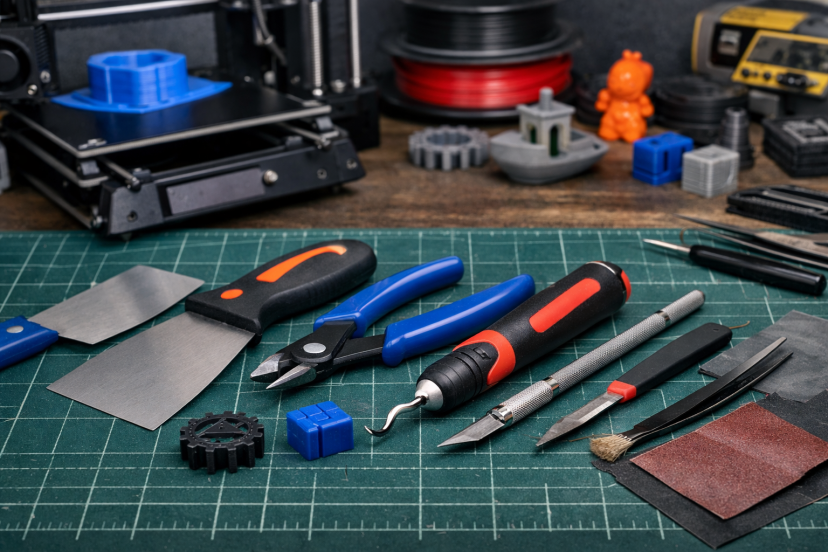
3D printing doesn’t end when the printer stops. The tools you use to remove, clean, and maintain your prints play a big role in how good the final result looks and how often prints succeed. The right 3D printer tools help prevent damage, reduce failures, and save time—whether you print for fun or for profit. We’ll go over the tools that are actually worth using, explain when to use them, and show how they can improve your prints without buying new hardware.
Why the Right 3D Printer Tools Make a Huge Difference
It’s tempting to think that upgrading your printer will solve everything. However, seasoned makers know better.
Good tools help you:
- Remove prints safely without damage
- Clean edges for professional-looking results
- Prevent clogs and extrusion issues
- Extend the life of nozzles and moving parts
- Work faster with fewer mistakes
According to multiple in-depth reviews from maker communities and university fabrication labs, post-processing accounts for up to 40% of perceived print quality. That means your tools directly affect how your prints look, feel, and function.
Even better, tools cost far less than printer upgrades—yet deliver immediate improvements.
Must-Have 3D Printer Tools for Every Maker
Precision Tools for Print Cleanup
Clean removal and finishing separate rough prints from polished results.
- Print scrapers help release parts without bending beds or snapping prints
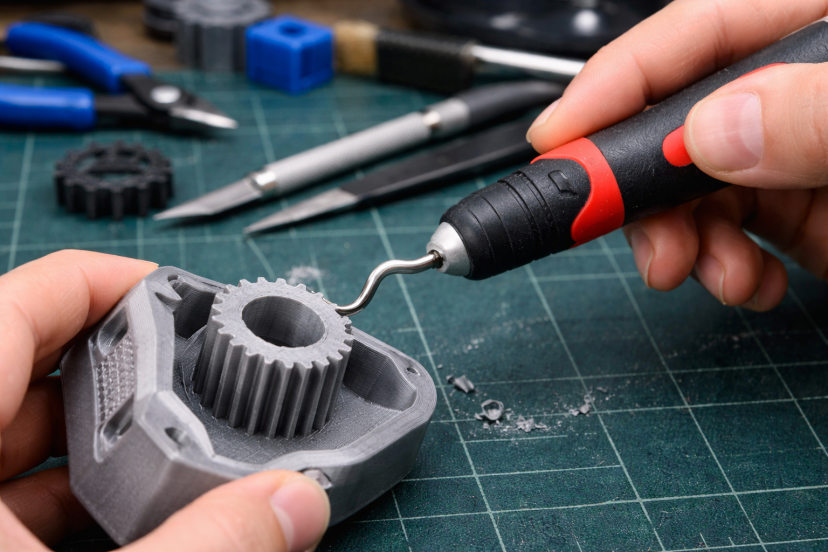
- Deburring tools remove sharp edges and layer artifacts
- Flush cutters trim supports cleanly without stressing fragile parts
Used correctly, these tools turn “good enough” prints into sellable products.
Maintenance Tools That Protect Your Printer
Maintenance isn’t glamorous—but it’s essential.
- Nozzle cleaning needles prevent partial clogs
- Hex key sets handle belt tension and frame adjustments
- Cleaning brushes remove filament residue safely
Studies from industrial additive manufacturing facilities show that routine nozzle maintenance reduces print failure rates by over 25%. For hobbyists, that means less frustration. For professionals, that means fewer wasted materials.
Why Your Prints Improve When You Use the Right Tools
If you’ve ever pulled a print off the bed and thought, “This could look better,” you’re not alone. Most prints don’t fail because the printer is bad. They struggle because the steps around the print—cleanup, maintenance, and finishing—get rushed or skipped.
One well-known review on post-processing in 3D printing looked at what happens after a part is printed. The researchers found that surface roughness, sharp edges, and leftover support marks are common across almost all printing methods. These issues aren’t defects in the printer itself. They’re normal side effects of the process. That’s where simple tools like scrapers, deburring tools, and cutters come in. The study shows that careful cleanup improves both the look and usability of printed parts.
Another study focused on everyday desktop 3D printers—the same kind used by most hobbyists. When researchers tracked real printing sessions, they found that more than 40% of prints failed. A big reason wasn’t bad settings or broken machines. It was clogged nozzles, skipped cleaning, and poor handling of finished parts. In short, many failures could have been avoided with basic maintenance tools and better habits.
Clean removal, regular nozzle care, and simple finishing steps lead to smoother surfaces, stronger parts, and fewer reprints. The right tools don’t just make your prints look nicer—they help you waste less time, less filament, and a lot less patience.
How the Right Tools Can Increase Print Quality and Profits
If you plan to sell your prints, tools aren’t optional—they’re strategic.
Clean edges, accurate dimensions, and smooth finishes directly influence buyer trust. That’s why many successful makers focus on tools before scaling production.
If you’re thinking about selling your prints, this guide on 3D printed products to sell shows real examples of what people are actually making and selling.
Better tools mean:
- Fewer rejected prints
- Higher perceived value
- Faster turnaround times
Over time, those gains compound.
How Tool Choice Changes Results by Filament Type
Different filaments react differently once a print is finished, so using the same tools every time can work against you. A small change in tool choice often makes cleanup faster and helps avoid damaged parts.
PLA is easy to work with, but it can chip if you rush removal. A thin, flexible scraper lifts prints cleanly, and a deburring tool quickly smooths edges. There’s usually no need to sand or force anything.
PETG sticks harder to the bed and stretches more than PLA. Using too much force can bend the print. A wider scraper with steady pressure works better here, and flush cutters help remove supports without tearing the surface.
ABS handles trimming well, but it shows marks if tools are dull. Sharp cutters and a deburring tool keep edges clean and reduce visible support scars.
Nylon and carbon-fiber blends are tough on everything—including your tools. Hardened cutters and quality nozzle needles last longer and make cleanup far less frustrating.
In short, when your tools match the filament, prints come off cleaner and intact. It’s an easy way to get better results without changing your printer or settings.
Conclusion
Good prints come from more than just a well-tuned printer. The tools you use for removal, cleanup, and maintenance directly affect how your prints look, fit, and hold up over time. By choosing the right tools and using them consistently, you can reduce failed prints, improve finish quality, and make the entire printing process more reliable. Whether you’re printing as a hobby or selling finished parts, a solid tool setup is one of the simplest ways to get better results without changing your machine.
FAQs
1. What are the most essential 3D printer tools for beginners?
A scraper, flush cutters, nozzle cleaning needles, and a deburring tool cover most beginner needs.
2. Do professional 3D printers still need manual tools?
Yes. Even industrial printers rely on post-processing tools for finishing and inspection.
3. How often should a 3D printer nozzle be cleaned?
Light cleaning weekly is ideal. Heavy users should check nozzles every few prints.
4. Can tools really improve print quality without upgrading the printer?
Absolutely. Post-processing often has a bigger visual impact than hardware upgrades.
5. Are cheap tool kits worth buying?
Some are, but quality matters. Poor tools can damage prints or your printer.