Top 10 Filament Dryers
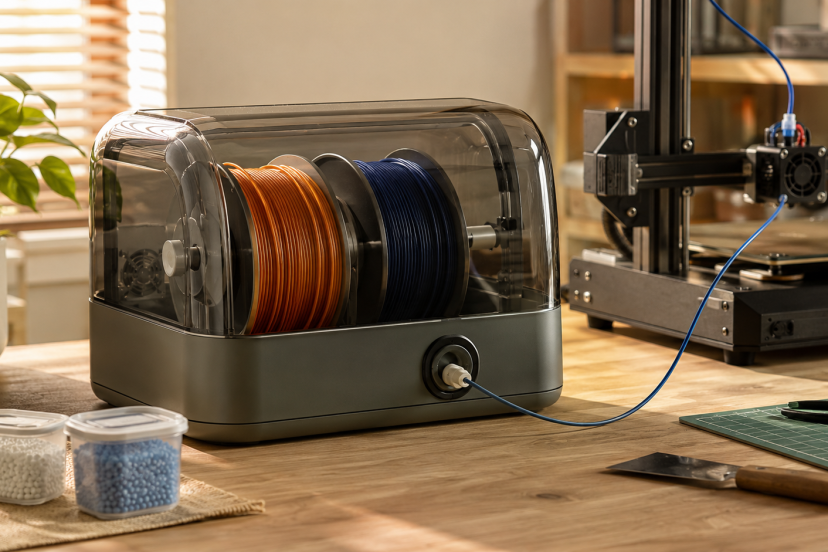
A spool can look perfectly fine and still contain enough moisture to cause stringing, popping, rough surfaces, and inconsistent extrusion. This is especially common with PETG, TPU, nylon, and other materials that absorb humidity from the air. The best filament dryers remove that moisture while keeping the spool ready to feed directly into your printer. We compared capacity, maximum temperature, airflow, controls, material compatibility, and verified Amazon customer feedback to find options for everyone from casual PLA users to multi-printer workshops.
Our Top Picks
| Product | Best For | Key Feature | Rating | Read More |
| SUNLU S4 | Best overall | Dries four spools at once | ★★★★⯪ | Read more |
| Creality Space Pi Plus | Two-spool printing | Dual-spool 360° heating | ★★★★⯪ | Read more |
| Polymaker PolyDryer | Drying and storage | Modular sealed dry box | ★★★★⯪ | Read more |
| SUNLU S2 | Single-spool use | Compact 70°C chamber | ★★★★⯪ | Read more |
| Sovol SH02 | Best value | Dual-spool PTC heating | ★★★★⯪ | Read more |
| SUNLU AMS Heater | Bambu Lab AMS users | Heats four AMS spools | ★★★★⯪ | Read more |
| Creality Space Pi X4 | Engineering materials | Two chambers reaching 85°C | ★★★★⯪ | Read more |
| Chitu Systems E1 | Flexible workstations | Two detachable dry boxes | ★★★★☆ | Read more |
| Creality Space Pi | Compact workspaces | Material presets and memory | ★★★★⯪ | Read more |
| Sovol SH01 | Budget dual-spool drying | Large, straightforward chamber | ★★★★☆ | Read more |
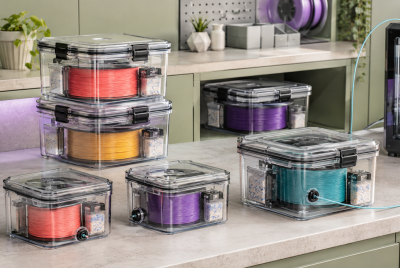
Filament dryers does not replace good storage. Once a spool is dry, keep it in a sealed container with fresh desiccant. Our guide to choosing and storing 3D printer filament explains how storage conditions affect different materials.
1. SUNLU S4 Filament Dryer
Best for: Most 3D-printing workshops
Rating: ★★★★⯪

The SUNLU S4 earns our top position because it combines four-spool capacity with genuinely useful environmental controls. Its 350-watt PTC heater, three circulation fans, and 70°C maximum temperature make it suitable for commonly used PLA, PETG, ABS, TPU, and nylon.
Intelligent humidity control can restart the drying cycle when moisture rises inside the chamber. That makes the S4 particularly convenient for makers who leave several frequently used materials loaded and ready to print.
Key features:
- Holds up to four standard spools
- Three internal circulation fans
- Maximum temperature of 70°C
- Automatic humidity-control mode
- Multiple filament outlets
Pros:
- Excellent capacity for the footprint
- Even heat circulation
- Can dry while feeding several printers
Cons:
- Larger than a single-spool dryer
- More machine than an occasional PLA user needs
Why we recommend it: It offers the most practical mix of capacity, automation, and material compatibility for serious hobbyists.
2. Creality Space Pi Plus
Best for: Printing from two spools
Rating: ★★★★⯪

The Space Pi Plus holds two spools and uses circulating hot air to heat them from multiple directions. Its 45°C to 70°C adjustment range covers everyday filaments, while built-in material presets make setup less intimidating for newer users.
A color touchscreen displays temperature, remaining time, and humidity. Power-loss memory is another welcome touch when a brief interruption would otherwise reset a long drying session.
Key features:
- Two-spool capacity
- 360-degree hot-air circulation
- Adjustable 45°C–70°C temperature
- Material presets
- Power-loss memory
Pros:
- Clear, convenient interface
- Useful for dual-color printing
- Feeds filament during drying
Cons:
- Lid requires extra clearance when open
- Takes more desk space than expected
Why we recommend it: It is a polished middle ground between compact single-spool boxes and larger four-spool systems.
3. Polymaker PolyDryer
Best for: Drying, storing, and printing without reopening the box
Rating: ★★★★⯪

Polymaker takes a modular approach. The PolyDryer includes a powered drying dock and a separate sealed storage box, allowing you to dry a spool and then move the entire box without exposing the filament.
The box supports direct printing, so moisture-sensitive filament can remain enclosed throughout a job. Additional storage boxes can be purchased separately and rotated through the same dryer base.
Key features:
- Separate drying dock and storage box
- Three drying power levels
- Airtight storage design
- Supports 1.75, 2.85, and 3mm filament
- Direct-printing outlets
Pros:
- Excellent moisture protection after drying
- Expandable modular system
- Compact one-spool footprint
Cons:
- Extra boxes increase the overall cost
- One spool can be actively dried at a time
Why we recommend it: This is the strongest option for users who want a complete dry-to-storage workflow rather than a basic heated chamber.
4. SUNLU S2 Filament Dryer
Best for: Compact single-spool drying
Rating: ★★★★⯪

The upgraded SUNLU S2 is a sensible choice when you normally print with one material at a time. Its built-in fan circulates warm air through the chamber, while the 35°C to 70°C range accommodates everything from PLA to more moisture-sensitive TPU and nylon.
A large touchscreen keeps the controls straightforward. The timer can run for up to 99 hours, which is useful when drying stubborn engineering filament at a safe, material-appropriate temperature.
Key features:
- One-spool chamber
- Built-in circulation fan
- Maximum temperature of 70°C
- Touchscreen controls
- Up to 99-hour timer
Pros:
- Small desktop footprint
- Wide temperature and timer range
- Filament can feed directly to a printer
Cons:
- Holds only one spool
- Touch controls may require a firm press
Why we recommend it: It covers the features most home users need without occupying a large portion of the workbench.
5. Sovol SH02 Filament Dryer
Best for: Affordable dual-spool capacity
Rating: ★★★★⯪

The Sovol SH02 offers room for two standard spools, PTC heating, a circulation fan, and a touchscreen without pushing into premium four-spool territory. One-touch presets help users choose suitable settings for PLA, PETG, TPU, or ABS.
Its sealed chamber can also serve as short-term storage between prints. For lasting protection, however, you should still add desiccant and periodically check the internal humidity.
Key features:
- Holds two 1kg spools
- PTC heater and circulation fan
- Touchscreen interface
- Material presets
- Multiple filament outlets
Pros:
- Strong value for two-spool users
- Simple controls
- Useful for multicolor projects
Cons:
- Lower maximum heat than heavy-duty models
- Bulky for someone using only one spool
Why we recommend it: The SH02 makes dual-spool drying accessible without stripping away airflow or convenient controls.
6. SUNLU AMS Heater
Best for: Bambu Lab AMS Gen 1 owners
Rating: ★★★★⯪

This specialized heater converts a compatible Bambu Lab AMS into an active four-spool drying system. It can heat to 70°C while allowing filament to remain loaded for multicolor printing.
Installation is more involved than placing a spool in a standalone dryer, but the finished setup conserves desk space and reduces spool handling.
Pros:
- Uses the AMS you already own
- Dries four loaded spools
- Supports printing during heating
Cons:
- AMS is not included
- Not useful outside compatible AMS setups
Why we recommend it: It solves a specific problem elegantly for Bambu users who want active heating inside their existing material system.
7. Creality Space Pi X4
Best for: Nylon, PC, and high-temperature materials
Rating: ★★★★⯪

The Space Pi X4 uses two independently controlled chambers, each holding two spools. Its dual 200-watt PTC heating system reaches up to 85°C, giving it a meaningful advantage when drying nylon, polycarbonate, and other demanding materials.
The separate chambers also let you dry different filament types under different conditions.
Pros:
- Four-spool capacity
- High 85°C maximum
- Independent chamber controls
- Well suited to engineering filament
Cons:
- Large and relatively power-hungry
- Excessive for PLA-only printing
Why we recommend it: Few consumer dryers combine four-spool capacity, independent zones, and temperatures suitable for engineering materials.
8. Chitu Systems E1
Best for: Modular multi-printer workstations
Rating: ★★★★☆
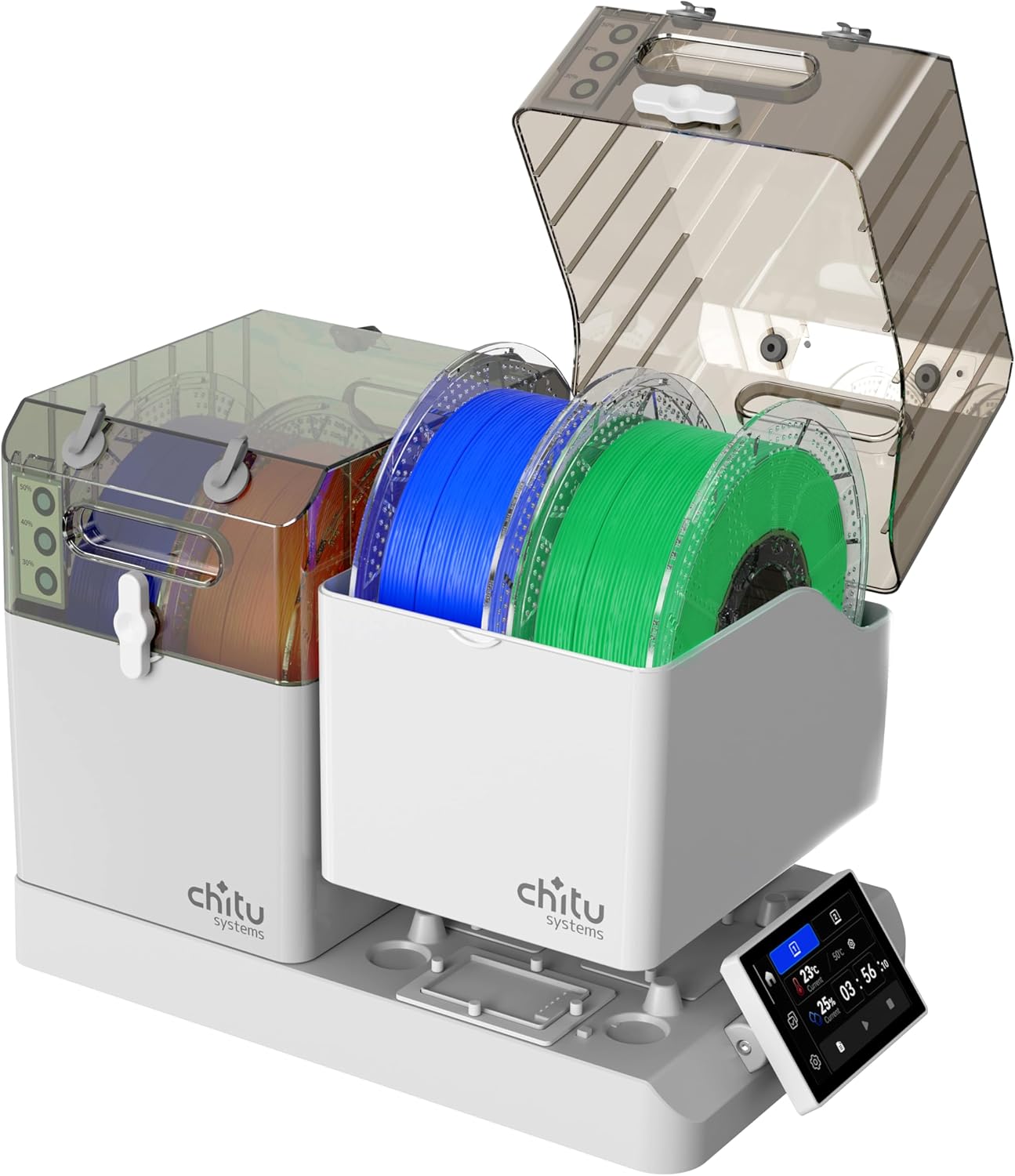
The Chitu Systems E1 has two removable chambers that collectively hold four spools. Each side can operate independently, and the detached boxes can function as sealed storage or sit near different printers.
Magnetic sealing plates help close unused filament outlets, while compatibility with AMS Lite setups expands its usefulness.
Pros:
- Two removable two-spool boxes
- Independent temperature control
- Flexible placement around several printers
- Auto-humidity hold
Cons:
- More complex than a conventional dryer
- Limited long-term customer history
Why we recommend it: Its detachable design is unusually practical for makers who regularly rearrange spools between machines.
9. Creality Space Pi
Best for: Beginners who want automatic presets
Rating: ★★★★⯪

The single-spool Space Pi delivers 360-degree hot-air circulation in a cleaner, smaller package than the Plus. Material presets reduce guesswork, while the screen displays temperature, humidity, and remaining drying time.
It is especially appealing for a beginner moving beyond PLA and experimenting with PETG or TPU.
Pros:
- Intuitive material presets
- Even circulating airflow
- Compact single-spool design
- Remembers settings after power loss
Cons:
- No second-spool capacity
- Hinged lid needs rear clearance
Why we recommend it: It is easy to operate but offers enough adjustment to remain useful as your material collection grows.
10. Sovol SH01 Filament Dryer
Best for: Budget-conscious users needing two-spool space
Rating: ★★★★☆

The Sovol SH01 is an older and simpler design, but its roomy chamber remains useful for drying two regular spools or one oversized spool. The upgraded version adds a fan to improve circulation over earlier passive-heating designs.
Its Amazon rating sits slightly below our preferred 4.3-star threshold, yet the large volume of customer feedback and affordable dual-spool format make it a reasonable budget alternative.
Pros:
- Holds two standard spools
- Straightforward operation
- Strong review history
- Usually more affordable than premium models
Cons:
- ★★★★☆ rating falls below our preferred cutoff
- Less refined airflow and controls
- Lower heat capability than newer machines
Why we recommend it: It gives occasional users practical drying capacity without requiring a premium four-spool investment.
What to Look for in Filament Dryers
Choose capacity according to the number of spools you actively use—not the size of your entire collection. One-spool filament dryers suit most hobbyists, while dual and four-spool machines benefit multicolor printers and busy workshops.
Temperature is equally important. PLA generally needs gentler heat than nylon or polycarbonate, and excessive temperature can soften filament or deform a plastic spool. Always follow the filament manufacturer’s instructions instead of automatically selecting the filament dryers maximum setting.
Look for these practical features:
- Circulating fan: Distributes warm air more evenly.
- Adjustable temperature: Accommodates different materials safely.
- Humidity display: Helps you monitor chamber conditions.
- Direct-feed outlet: Lets you print while the spool stays enclosed.
- Sealed chamber: Slows moisture absorption after drying.
- Long timer: Useful for nylon and heavily saturated filament.
Once your material is conditioned, organize it away from open air. These 3D-printed filament storage rack ideas can help you create a tidier spool area, although exposed racks work best for sealed bags or containers rather than bare filament.
Final Thoughts
The SUNLU S4 is the best all-around choice among today’s filament dryers because it combines four-spool capacity, circulating heat, and automatic humidity control. The SUNLU S2 is a better fit for a compact one-printer setup, while the PolyDryer excels when sealed storage matters as much as active drying. If you regularly print nylon, PC, or other engineering materials, the Creality Space Pi X4 offers the higher temperature and independent chambers those filaments deserve.
FAQs
Do filament dryers really improve print quality?
They can make a noticeable difference when filament has absorbed moisture. Proper drying may reduce popping, stringing, bubbles, rough walls, weak layer adhesion, and inconsistent extrusion. A dryer will not correct poor slicer settings or mechanical printer problems.
What temperature should I use to dry filament?
It depends on the material and brand. PLA often requires relatively low heat, while PETG, TPU, nylon, and polycarbonate may need higher temperatures or longer cycles. Follow the spool manufacturer’s drying recommendation and confirm that the spool itself tolerates the selected heat.
Can I print directly from a filament dryer?
Yes, provided the dryer has a suitable filament outlet and the spool turns freely inside. Direct feeding is especially helpful with nylon and TPU because it limits their exposure to humid air during long prints.
How long does filament take to dry?
A mildly damp spool may improve after several hours, while heavily saturated nylon can require a much longer cycle. Material type, spool size, dryer temperature, airflow, and humidity all affect drying time.
Is a filament dryer the same as a dry box?
No. Filament dryers actively heats and circulates air to remove absorbed moisture. A dry box primarily slows future moisture absorption with an airtight seal and desiccant. Some products perform both functions, but many basic storage boxes cannot restore already-wet filament.