Top 10 3D Printer Cameras
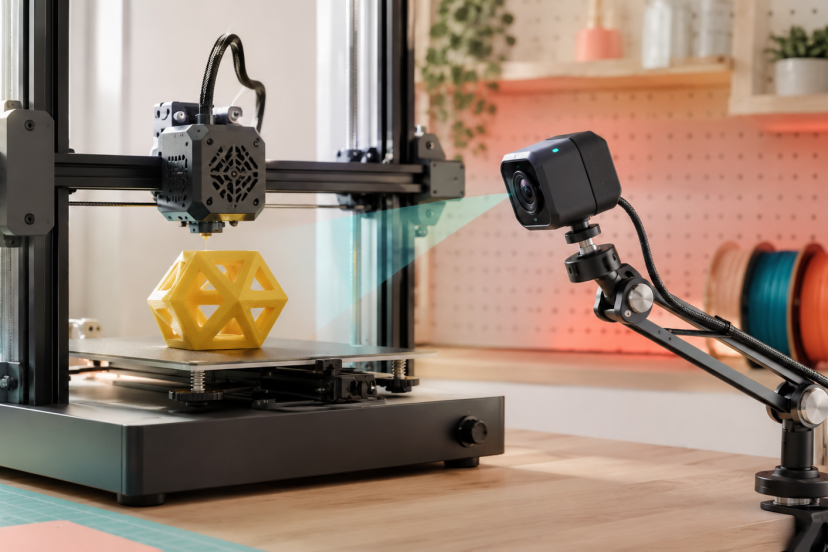
A 12-hour print can fail five minutes after you leave the room. The right 3D printer cameras let you check progress remotely, catch spaghetti failures early, and record satisfying time-lapse videos without hovering beside the machine.
This guide compares purpose-built printer cameras, OctoPrint webcams, and smart security cameras. Whether you want remote printer control or a simple live view, there is an option here for your setup.
Our Top Picks
| Product | Best For | Key Feature | Rating | Read More |
| Mintion Beagle V2 | Best overall | Remote control and time-lapses | ★★★★⯪ | Read more |
| Creality Nebula Camera | Creality printers | Night vision and failure detection | ★★★★⯪ | Read more |
| Logitech C920x | OctoPrint | Sharp 1080p video | ★★★★⯪ | Read more |
| Logitech C270 | Budget OctoPrint setups | Reliable 720p USB feed | ★★★★⯪ | Read more |
| Tapo C110 | High-resolution monitoring | 2K video and local storage | ★★★★⯪ | Read more |
| Tapo C210 | Wide-area coverage | Remote pan and tilt | ★★★★⯪ | Read more |
| Wyze Cam v4 | Low-light monitoring | 2.5K color night vision | ★★★★⯪ | Read more |
| eufy Indoor Cam E30 | Premium smart monitoring | 4K pan-and-tilt video | ★★★★⯪ | Read more |
| FREENOVE 5MP Camera | Raspberry Pi projects | Adjustable-focus Pi camera | ★★★★⯪ | Read more |
| Arducam 1080p USB Module | Custom enclosures | Compact low-light module | ★★★★⯪ | Read more |
Best 3D Printer Cameras Reviewed
1. Mintion Beagle V2 Camera

The Mintion Beagle V2 is the most complete choice for users who want more than a passive video feed. It combines live monitoring, compatible-printer control, and automatic time-lapse creation in one compact device.
Unlike an ordinary webcam, the Beagle runs its own camera software. You can view a print through a browser or mobile app and, with supported printers, start, pause, or stop the job remotely. Dual-band 2.4GHz and 5GHz Wi-Fi also makes setup more flexible.
Key features:
- 1080p video with manual focus
- Automatic clean time-lapse videos
- Remote monitoring and printer controls
- Dual-band Wi-Fi
- Broad compatibility with popular FDM printers
Best for: Users who want an easy, self-contained monitoring system.
Pros:
- Does not require a Raspberry Pi
- Designed specifically for 3D printing
- Straightforward app-based operation
Cons:
- Remote control depends on printer compatibility
- Manual focusing takes a little adjustment
Why we recommend it: It provides the best balance of convenient setup, remote access, and printer-specific features.
2. Creality Nebula Camera

Creality owners should put the Nebula Camera near the top of their list. It integrates with supported Creality hardware and offers 1080p monitoring, time-lapse recording, infrared night vision, and compatible failure-detection functions.
The infrared fill light is particularly helpful when a printer operates overnight. However, this is not a universal USB webcam. Check compatibility carefully, especially if you do not use a Sonic Pad, Nebula Pad, Ender-3 V3-series machine, CR-10 SE, or supported HALOT model.
Key features:
- 1920 × 1080 resolution
- Infrared night vision
- Time-lapse recording
- Real-time monitoring
- Spaghetti-detection support on compatible systems
Best for: Supported Creality printers and control pads.
Pros:
- Clean integration with Creality’s ecosystem
- Useful after-dark visibility
- Small, easy-to-position body
Cons:
- Limited compatibility outside Creality products
- Some features depend on connected hardware
Why we recommend it: It is an affordable, purpose-built upgrade for compatible Creality machines.
3. Logitech C920x HD Pro Webcam

The Logitech C920x remains a dependable option for OctoPrint, Klipper, and computer-based monitoring. Its 1080p image is detailed enough to inspect layer lines, supports, and early signs of poor bed adhesion.
Automatic light correction helps in workshops where lighting changes throughout the day. The standard tripod thread also makes it easier to use printable arms and camera mounts.
Key features:
- 1080p video at 30 fps
- Automatic light correction
- Autofocus
- USB connection
- Tripod-ready mounting point
Best for: OctoPrint users wanting a sharp, proven webcam.
Pros:
- Excellent image quality
- Extensive community support
- Easy to mount and reposition
Cons:
- More expensive than basic 720p webcams
- Does not control a printer by itself
Why we recommend it: Its combination of clarity, reliability, and mounting options makes it a strong OctoPrint camera.
4. Logitech C270 HD Webcam

You do not need 4K video merely to determine whether a print is still attached to the bed. The Logitech C270 provides a reliable 720p feed at a much lower cost than premium webcams.
It works well with Raspberry Pi-based monitoring, and its fixed focus keeps setup simple. Fine surface defects may be harder to identify, but the image is sufficient for routine progress checks.
Key features:
- 720p video at 30 fps
- Automatic light correction
- Plug-and-play USB connection
- Compact monitor clip
- Fixed-focus lens
Best for: Budget OctoPrint and Klipper installations.
Pros:
- Affordable and widely supported
- Simple setup
- Low bandwidth requirements
Cons:
- Limited detail compared with 1080p cameras
- Integrated clip offers modest positioning control
Why we recommend it: It delivers dependable monitoring without making a basic OctoPrint build unnecessarily expensive.
5. TP-Link Tapo C110

The Tapo C110 is a practical choice when you want remote viewing without connecting a camera to the printer or a Raspberry Pi. Its 2K resolution provides a detailed picture, while infrared night vision keeps the build plate visible in darkness.
You can record to a microSD card or use optional cloud storage. It cannot communicate directly with most printers, so stopping a failed job requires a separate smart plug or printer-control interface.
Key features:
- 2K resolution
- Night vision
- Phone alerts and live viewing
- Local microSD recording
- Two-way audio
Best for: High-resolution, app-based monitoring.
Pros:
- Clear video for inspecting prints
- No Raspberry Pi required
- Local storage option
Cons:
- Motion alerts are not designed for print failures
- No native printer controls
Why we recommend it: It is an inexpensive way to obtain a sharp remote view and continuous recording.
6. TP-Link Tapo C210

If one fixed viewpoint cannot cover your printer, consider the Tapo C210. Its pan-and-tilt mechanism lets you inspect the nozzle, filament path, and surrounding workspace from the app.
The 2K image and infrared night vision are useful for large-format printers or rooms containing multiple machines. Position it far enough away to prevent the moving print bed from blocking the lens.
Key features:
- 2K video
- 360-degree horizontal pan
- 114-degree vertical tilt
- Infrared night vision
- microSD and optional cloud storage
Best for: Large printers and multi-printer workspaces.
Pros:
- Remotely adjustable viewing angle
- Clear daytime and nighttime image
- Strong value for its feature set
Cons:
- Needs more mounting space
- Does not offer native print controls
Why we recommend it: Few affordable cameras provide this much control over the viewing angle.
7. Wyze Cam v4

Dim workshops can make ordinary webcams almost useless. The Wyze Cam v4 counters that problem with 2.5K resolution, improved color night vision, a wide field of view, and a built-in spotlight.
Its weather-resistant construction also suits garage workshops where humidity and dust may be greater concerns. Like the Tapo models, it monitors the printer independently rather than integrating directly with it.
Key features:
- 2560 × 1440 resolution
- 120-degree field of view
- Color night vision
- Built-in spotlight
- Wi-Fi 6 connectivity
Best for: Garages and poorly lit printing areas.
Pros:
- Detailed low-light video
- Wide coverage
- Indoor or outdoor construction
Cons:
- Advanced smart features may require a subscription
- Separate equipment is needed for remote printer shutdown
Why we recommend it: It delivers one of the clearest low-light views among compact smart cameras.
8. eufy Indoor Cam E30

The eufy Indoor Cam E30 is the premium smart-camera pick, providing 4K resolution, pan-and-tilt coverage, color night vision, and local recording. The extra detail is valuable when you want to inspect small models or monitor several printers.
Its advanced motion tracking is designed for people and pets rather than print failures, so it should not be confused with specialized spaghetti detection. Nevertheless, it is an excellent general workshop camera.
Key features:
- 4K UHD video
- 360-degree pan-and-tilt coverage
- Color night vision
- Local storage support
- Remote app viewing
Best for: Premium workshop and multi-printer monitoring.
Pros:
- Exceptionally detailed video
- Flexible viewing angles
- Local recording available
Cons:
- More camera than a basic setup needs
- No direct printer integration
Why we recommend it: It offers premium image quality and broad room coverage without limiting the camera to one machine.
9. FREENOVE 5MP Raspberry Pi Camera

The FREENOVE 5MP Camera is aimed at hands-on users building a compact Raspberry Pi monitoring system. Its adjustable holder and ribbon connection create a tidier installation than a full-size webcam.
It supports common Raspberry Pi boards and provides 1080p output. Setup requires more effort, but the small module can sit close to the print bed without dominating the workspace.
Key features:
- 5MP sensor
- 1080p output
- Adjustable mounting holder
- Ribbon-cable connection
- Raspberry Pi compatibility
Best for: Compact DIY OctoPrint installations.
Pros:
- Small footprint
- Holder included
- Easy to integrate into printed mounts
Cons:
- Requires a compatible Raspberry Pi
- Less plug-and-play than a USB webcam
Why we recommend it: It is a neat, affordable foundation for a custom Pi-based monitoring station.
10. Arducam 1080p USB Camera Module

Arducam’s compact USB module is ideal when a traditional webcam is too bulky. Its low-light performance and adjustable focus make it suitable for enclosures, electronics projects, and close-up nozzle views.
Because it uses USB, it can work with compatible computers and many Raspberry Pi configurations. The exposed circuit-board design needs a protective case or printed housing in a busy workshop.
Key features:
- 1080p USB video
- Adjustable-focus lens
- Low-light capability
- Compact board-level design
- UVC plug-and-play support
Best for: Custom enclosures and close-up camera mounts.
Pros:
- Flexible focus adjustment
- Fits into tight spaces
- Standard USB connectivity
Cons:
- Protective housing may be necessary
- More DIY-oriented than consumer webcams
Why we recommend it: It gives makers the flexibility to build a camera directly into a printer enclosure or custom mount.
How to Choose 3D Printer Cameras
Start by deciding whether you need monitoring only or remote printer control. A Tapo, Wyze, or eufy camera supplies an independent live view, while the Beagle V2 and compatible Creality systems can interact with supported printers.
For OctoPrint or Klipper, check operating-system and USB compatibility before buying. Resolution matters less than reliable focus, good lighting, and a viewing angle that shows both the nozzle and finished layers.
Mounting is equally important. Bedslingers need enough clearance for the moving bed, while enclosed printers benefit from compact modules and low-light performance. You can find more workspace upgrades in this guide to essential 3D printer accessories. If you are still choosing a machine, compare these recommended FDM 3D printers.
Final Thoughts
The best 3D printer cameras match the way you already manage your printer. Choose the Mintion Beagle V2 for an accessible all-in-one system, the Creality Nebula Camera for compatible Creality hardware, or the Logitech C920x for a proven OctoPrint setup. If you only need to check progress from your phone, the Tapo C110 provides excellent resolution and value without adding another computer to your workspace.
Frequently Asked Questions
What is the best camera for a 3D printer?
The Mintion Beagle V2 is the best all-around option for many users because it combines monitoring, compatible-printer control, and time-lapse creation. OctoPrint users may prefer the Logitech C920x.
Can I use any webcam with OctoPrint?
Many standard UVC USB webcams work with OctoPrint, including popular Logitech models. However, compatibility can vary by Raspberry Pi model, operating-system image, resolution, and available USB power.
Can 3D printer cameras stop a failed print?
3D printer cameras can stop a print only when connected to compatible control software or hardware. Ordinary security cameras provide a live view but usually require you to stop the printer through another app, web interface, or smart plug.
Where should I mount my 3D printer camera?
Position the camera slightly above the build plate with a clear view of the nozzle and current layers. Keep it outside the travel path of the bed, gantry, cables, and filament spool.
Do I need night vision for 3D printer cameras?
Night vision is useful when you run long prints in a dark room. Alternatively, a small LED light can produce a clearer color image and make subtle print defects easier to recognize.