How To Reduce 3D Printer Stringing
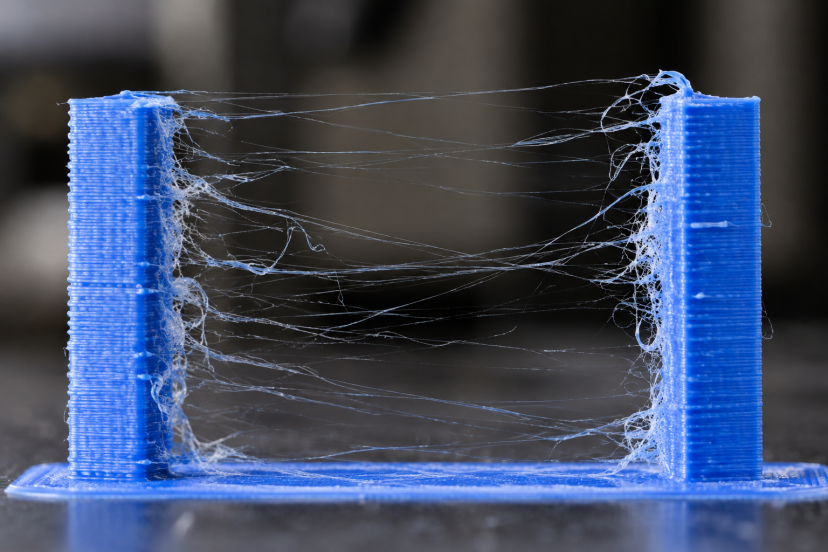
Few things are more annoying than lifting a finished model from the build plate and finding it covered in fine plastic hairs. 3D printer stringing can turn an otherwise clean print into something that looks as though it has been sitting in a spider web.
Fortunately, stringing usually does not mean something is seriously wrong with your printer. In most cases, molten filament continues leaking from the nozzle while the printhead travels between separate sections of the model.
The trick is figuring out why it keeps leaking. Temperature, filament moisture, retraction, travel movement, and even nozzle condition can all play a role. Instead of changing everything at once, work through the following fixes one at a time.
What Is 3D Printer Stringing?
Stringing happens when thin strands of plastic form between areas where your printer should not be extruding material.
Imagine printing two small towers. The nozzle finishes one tower and travels through open air toward the other. Ideally, no plastic leaves the nozzle during that move. When molten material continues to ooze out, it stretches into a thread between the towers.
A few tiny strands may clean up easily. Severe stringing can cover an entire model with wispy plastic, create rough surfaces, and make detailed parts much harder to finish.
The broader 3D printer troubleshooting guide covers stringing alongside under-extrusion, clogs, warping, and other common FDM problems.
What Causes 3D Printer Stringing?
Several variables can create the same visible problem.
Common causes include:
- Nozzle temperature that is too high
- Incorrect retraction settings
- Damp filament
- Slow or inefficient travel moves
- A dirty nozzle
- Material-specific behavior
- Poorly tuned slicer settings
Research supports the connection between these variables and string formation. A 2024 experimental analysis of stringing in FDM printers tested nozzle temperature, retraction speed, and retraction distance with PLA on an Ender 3. The results also demonstrate an important lesson: useful settings depend on the particular printer, material, and operating conditions.
That means you should treat someone else’s “perfect” profile as a starting point rather than a universal solution.
Dry Your Filament First
Before spending an hour adjusting retraction, check your filament.
Many plastics absorb moisture from the surrounding air. When damp filament reaches the hotend, that moisture can turn into vapor and interfere with smooth extrusion. You may notice popping sounds, bubbles, rough surfaces, blobs, or extra stringing.
Prusa specifically identifies moisture as a possible cause of stringing and notes that TPU, polyamide, and PVA tend to need more careful drying than common materials such as PLA.
Use the drying temperature and duration recommended by the filament manufacturer. Do not assume that hotter is better; excessive heat can deform filament or its spool.
After drying, keep opened spools in a sealed container or dry box with desiccant.
Lower the Nozzle Temperature Carefully
Temperature should be one of your first slicer adjustments.
When filament gets hotter, it generally flows more easily. That helps layer bonding, but overly fluid plastic can continue dripping from the nozzle during travel moves.
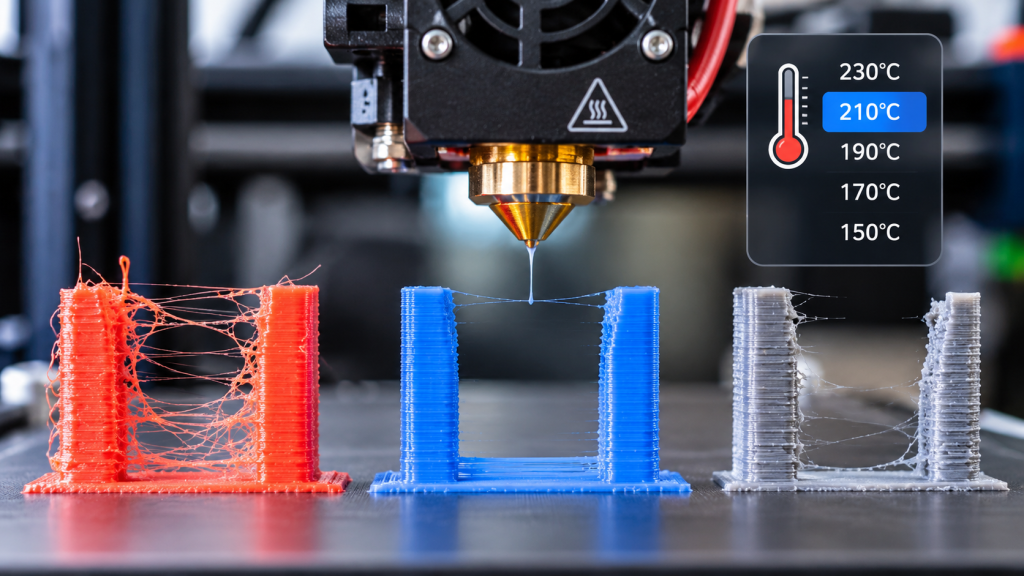
A broad academic review of material-extrusion troubleshooting lists excessive printing temperature among the causes of stringing and recommends testing temperature reductions in roughly 5–10°C steps. The material extrusion troubleshooting review also identifies retraction and filament condition as important factors.
Print a temperature tower rather than guessing.
Begin with a nozzle temperature that falls within the range suggested by the filament brand. Examine each section for strings, layer adhesion, surface quality, bridging, and overhang performance.
Do not simply choose the coolest section. A temperature that eliminates strings but creates weak layer bonding has not solved the problem.
Tune Retraction Distance
Retraction temporarily pulls filament backward before the nozzle makes a travel move.
That slight reversal reduces pressure inside the nozzle and helps prevent molten material from leaking out.
Retraction distance matters, but more is not automatically better.
Direct-drive extruders usually need relatively short retractions because the drive gears sit close to the hotend. Bowden systems often require more movement because filament travels through a longer tube.
Printer designs vary enough that copying a random retraction distance can create new problems. Excessive retraction may contribute to inconsistent extrusion, filament grinding, or clogging.
Print a dedicated retraction tower and increase the distance gradually until stringing improves. Your printer manufacturer’s default profile should be your baseline.
For a more systematic approach to tuning motion and extrusion, see this 3D printer calibration guide.
Adjust Retraction Speed
Retraction speed controls how quickly the extruder pulls filament away from the nozzle.
If retraction happens too slowly, molten plastic may keep escaping before pressure drops enough. However, pushing the value excessively high can cause the extruder to slip, grind filament, or lose steps.
Prusa similarly notes that increasing retraction speed may improve stringing but warns that excessive speeds can cause motor problems.
Change speed in small increments.
Most importantly, avoid tuning distance and speed at the same time. If you change two settings after every test, you will not know which adjustment actually helped.
Improve Travel Moves
Retraction gets most of the attention, but nozzle movement matters too.
During a travel move, the printer moves without intentionally extruding. Shorter and faster travel paths give molten filament less time to ooze.
Your slicer may also include settings designed to keep travel moves inside already printed areas.
For example, PrusaSlicer offers Avoid crossing perimeters, which tries to route travel moves without crossing visible outer walls.
Depending on your slicer, you may see similar options described as avoiding walls, combing, or optimizing travel.
These features will not repair badly tuned temperature or retraction settings, but they can make small remaining strings less visible.
Clean and Inspect the Nozzle
Sometimes the slicer is innocent.
Old filament can accumulate around the outside of the nozzle. Material stuck there may catch on the print and stretch into strands as the toolhead moves.
Heat the nozzle according to your printer’s maintenance instructions and carefully remove residue with appropriate tools.
A partial internal blockage can also disturb extrusion. If filament curls sharply, sputters, or flows inconsistently during manual extrusion, investigate the nozzle before spending more time adjusting retraction.
Replace a visibly worn nozzle when cleaning no longer restores predictable flow.
Match Your Approach to the Filament
Different materials behave differently.
PLA
PLA generally responds well to temperature and retraction tuning. If a previously clean PLA suddenly strings badly, moisture, a profile change, or an unusually high printing temperature deserves investigation.
PETG
PETG naturally tends to produce more strings than PLA. Prusa recommends controlling PETG stringing through appropriate retraction, temperature, and cooling while noting that lower nozzle temperatures can reduce the effect.
Do not lower temperature so much that layer strength suffers.
TPU
Flexible filament introduces another challenge because the material compresses and stretches inside the extrusion path.
Moisture also matters considerably with many flexible filaments. Prusa recommends drying TPU when stringing appears, particularly after poor storage.
Use a profile designed for your printer and specific flexible material rather than applying aggressive PLA retraction settings.
Use a Simple Stringing Calibration Routine
Random tweaking can make stringing harder to solve.
Try this sequence instead:
- Start with your printer manufacturer’s normal material profile.
- If the filament may have absorbed humidity, dry it thoroughly before printing.
- Print a small stringing test.
- Run a temperature tower.
- Choose the lowest temperature that still provides good extrusion and layer bonding.
- Tune retraction distance.
- Tune retraction speed.
- Review travel settings.
- Inspect the nozzle if stringing remains unusually severe.
- Save the successful profile.
Change one variable between tests and label your results.
This method takes a little patience, but it prevents you from chasing problems created by your previous adjustment.
Recommended Products for Reducing Stringing
These accessories will not magically correct poor slicer settings, but they can make diagnosis and maintenance much easier. Always confirm printer and nozzle compatibility before ordering.
1. SUNLU FilaDryer S2
The SUNLU FilaDryer S2 is particularly useful for PETG, TPU, nylon, and other moisture-sensitive materials. SUNLU specifies adjustable heating up to 70°C along with humidity monitoring and the ability to feed filament while drying.
Best for: Persistent stringing caused by damp filament.
2. ELEGOO PLA 1.75mm Filament
A fresh, consistent spool of ELEGOO PLA 1.75mm filament gives you a useful baseline when you are trying to determine whether your current filament contributes to the problem.
Best for: Calibration and everyday PLA test prints.
3. SOVOL 3D Printer Nozzle Cleaning Tool Kit
A SOVOL nozzle cleaning kit provides brushes and small maintenance tools that can help remove residue from compatible hotends and nozzles.
Best for: Routine hotend maintenance and investigating inconsistent extrusion.
4. Creality 0.4mm MK8 Brass Nozzles
Replacement Creality MK8 0.4mm brass nozzles can be useful for compatible Ender and CR-series machines when a worn or damaged nozzle makes extrusion inconsistent.
Best for: Replacing an old nozzle after cleaning fails to restore normal extrusion.
5. NEIKO Electronic Digital Caliper
The NEIKO electronic digital caliper is not a direct stringing fix, but it is useful for measuring filament, calibration parts, and dimensional accuracy while tuning the printer.
Best for: Makers who want measurable calibration results instead of relying entirely on visual inspection.
Conclusion
Reducing 3D printer stringing becomes much easier when you troubleshoot it in a logical order. Start with filament condition and nozzle temperature, then fine-tune retraction distance and speed. After that, optimize travel movements and inspect the nozzle. Most importantly, adjust just one setting between test prints so you can tell what actually improved the result.. A small stringing test takes only a fraction of the filament required for a full model, and a handful of controlled calibration prints can save hours of cleanup later. Once you find settings that work for your printer and filament, save that profile so your next clean print does not depend on remembering every adjustment.
FAQs
Why is my 3D printer suddenly stringing?
A sudden change often points to damp filament, a different slicer profile, changed temperature settings, nozzle contamination, or a hardware change. If the same profile worked previously, check the filament and nozzle before making large calibration changes.
Does higher retraction reduce stringing?
Increasing retraction can reduce stringing to a point, but excessive retraction can create extrusion problems or clogs. Adjust the distance gradually and use values appropriate for your printer’s extruder design.
Does lowering nozzle temperature stop stringing?
It often helps because cooler filament usually oozes less during travel moves. Lower the temperature gradually while watching layer adhesion, extrusion quality, and surface finish.
Can wet filament cause 3D printer stringing?
Yes. Moisture can interfere with smooth extrusion and contribute to stringing, bubbling, popping, and rough surfaces. Dry moisture-sensitive filament according to its manufacturer’s instructions before assuming the slicer profile is responsible.
What makes PETG more prone to stringing than PLA?
PETG tends to remain tacky and flow readily at printing temperatures, making it more prone to oozing during travel. Correct temperature, dry filament, appropriate retraction, cooling, and optimized travel paths can significantly reduce the problem.