3D Printing Supports: Best Settings and Techniques
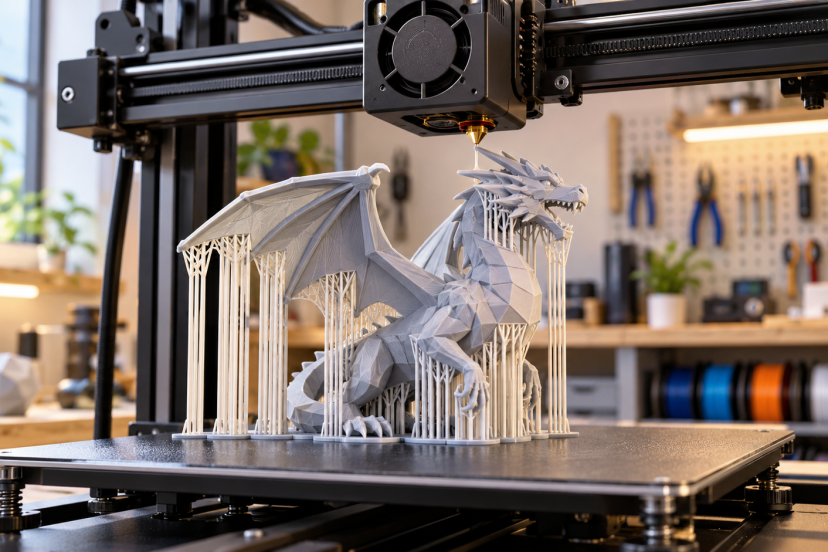
There are few things more aggravating than completing a lengthy print and ending up with droopy overhangs, nasty undersides, or supports that look like they’re fused to the model. It’s a bit of a balancing act to get 3D printing supports right. They should be able to support unsupported geometry without wasting too much filament or causing harm to the finished surface. A reasonable starting profile, good model orientation, and a few test prints can make a world of difference in support performance.
What Are 3D Printing Supports?
3d printing supports act like temporary scaffolding beneath parts of a model that cannot reliably print in open air.
FDM printers create objects one layer at a time. When a new layer extends too far beyond the layer below it, the hot filament may sag before it cools. Supports give that filament something to rest on.
However, not every overhang needs them. Many properly tuned FDM printers handle overhangs in roughly the 45- to 60-degree range, although cooling, nozzle diameter, layer height, material, and printer design all affect the limit.
Short bridges can also print successfully without supports. Before turning supports on everywhere, check the sliced preview and see what the printer can handle on its own.
Best 3D Printing Support Settings
There is no universal support profile, but these settings make useful starting points for a typical FDM printer using a 0.4 mm nozzle and roughly 0.2 mm layers.
| Setting | Good Starting Point |
| Overhang angle | 45–55° |
| Support density | 10–15% |
| Top Z distance | 0.12–0.20 mm |
| XY separation | 0.3–0.5 mm |
| Interface layers | 2–4 |
| Support placement | Build plate only when possible |
| Support style | Organic/tree or snug for many models |
Treat these numbers as test values rather than fixed rules. A well-calibrated machine will usually produce cleaner overhangs and need less support in the first place. This 3D printer calibration guide covers temperature, cooling, bridging, flow, and other adjustments worth dialing in before chasing support settings.
Overhang Angle
For many machines, 50 degrees makes a sensible starting threshold.
Raise or lower it after printing an overhang test. The goal is to support areas that actually need help without filling the model with unnecessary scaffolding.
Be careful when copying settings between slicers. Programs do not always define overhang angles the same way. PrusaSlicer, for example, describes its threshold relative to the horizontal plane, so changing the number does not necessarily behave the same way as changing a similarly named setting in another slicer.
Support Z Distance
Z distance determines how much vertical space sits between the top of the support structure and the printed part.
A smaller gap usually produces a cleaner underside, but supports become harder to remove. A larger gap releases more easily but can allow the supported surface to sag.
For a 0.2 mm layer-height print, roughly 0.12–0.20 mm offers a useful testing range. Prusa notes that top contact distances around 50–75% of layer height can work well in its slicer.
Support Density and Interface Layers
You rarely need dense support from top to bottom.
Start around 10–15% support density if your slicer uses percentage-based density. Then let interface layers create a tighter surface immediately beneath the model.
Two to four interface layers work well for many prints. Increasing them can improve supported surfaces, although it also adds material and may make removal harder.
XY Distance
XY separation controls the horizontal clearance between supports and nearby walls.
Around 0.3–0.5 mm gives you room to remove supports without letting them fuse heavily into vertical surfaces. Increase the distance if supports keep sticking to sidewalls.
Which Type of Support Should You Use?
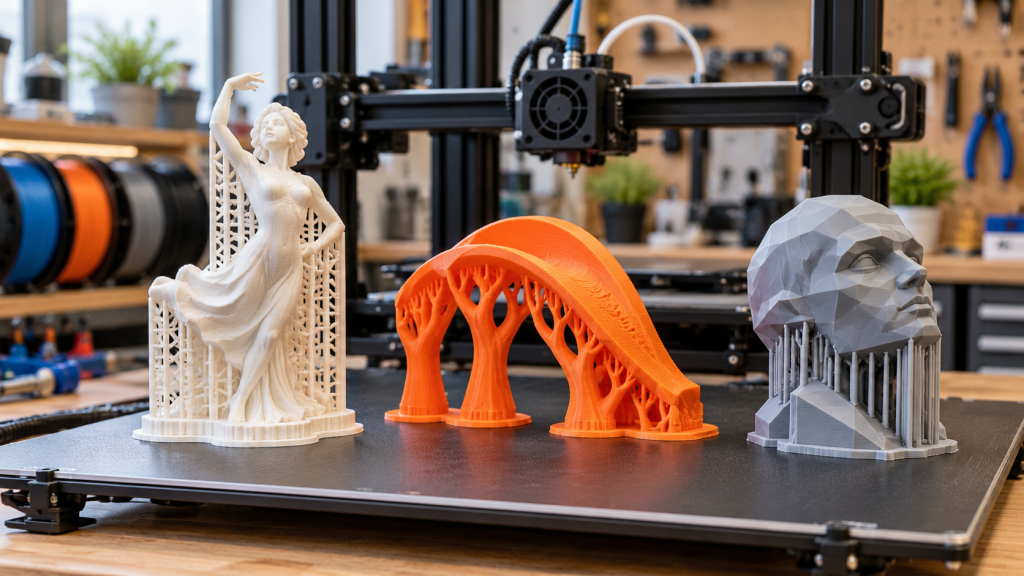
Organic or tree supports work especially well for figures, curved models, miniatures, and irregular overhangs. Their branches reach the areas that need support while avoiding much of the surrounding model.
Prusa’s organic supports, for example, allow control over branch diameter, angle, tip size, spacing, and density.
Grid or normal supports make more sense beneath broad, flat overhangs that need consistent coverage. They can be stronger than thin branching structures but often consume more material.
Snug supports follow the shape of an overhang more closely and can reduce unnecessary material around the model.
For dual-material machines, soluble or breakaway interface materials open another option. They let you place support much closer to the model because you do not have to peel the entire structure away mechanically.
Techniques for Better Supports and Cleaner Prints
The easiest support to remove is the one you never had to print.
Start by rotating the model. A 20- or 30-degree change in orientation can turn a troublesome horizontal surface into a printable slope.
For complex parts, consider splitting the model into two or more pieces. Print each section in a better orientation and assemble them afterward.
Use support blockers and painted supports instead of automatically supporting every detected overhang. Modern slicers let you force support beneath one troublesome feature while blocking it from areas that print fine without help.
You can also design with printing in mind. Chamfers, gradual slopes, teardrop-shaped holes, and self-supporting angles reduce dependence on temporary structures.
Research into self-supporting structures for additive manufacturing highlights the same basic idea: controlling geometry and overhang constraints can reduce support material, printing time, waste, and post-processing.
How to Fix Common Support Problems
Supports are fused to the model: Increase the Z distance slightly. You can also reduce interface density or check whether your nozzle temperature is unnecessarily high.
The supported surface looks rough: Reduce the Z gap in small steps or add another interface layer. Better cooling can also help PLA overhangs.
Support towers fall over: Use a sturdier support pattern, increase branch density where needed, slow the support print speed, or add a brim around narrow support structures. These are also among the fixes recommended in Prusa’s troubleshooting guidance.
Supports leave visible scars: Reduce unnecessary contact points and orient important cosmetic surfaces away from supports. After removal, light sanding and finishing can help. See this guide on smoothing 3D prints and removing surface imperfections for post-processing techniques.
Recommended Products
1. Hakko CHP-170 Micro Cutter
The compact angled jaws make this cutter useful for clipping thin support branches close to the model without twisting them off by force.
2. AFA Tooling Deburring Tool
A swivel-blade deburring tool works well for cleaning support scars, brims, rough holes, and sharp plastic edges after removal. The AFA model includes replaceable high-speed-steel blades and is specifically marketed for 3D-printed plastics.
3. Xuron 450 Tweezer Nose Pliers
Long, narrow jaws help you reach support material inside small cavities where ordinary pliers or your fingers cannot get a good grip.
4. 45-Piece 3D Printer Tool Kit
For a new workbench, this kit combines flush cutters, long-nose pliers, deburring tools, files, cleaning tools, calipers, and print-removal accessories in one set.
5. 3M Virtua CCS Safety Glasses
Small support pieces can shoot away unexpectedly when clipped or snapped. Eye protection is cheap insurance, especially when removing stiff PLA or PETG supports.
Conclusion
Good 3D printing supports should do their job and then get out of the way. Start with sensible overhang, Z-distance, interface, and separation settings, then tune them with small test prints. More importantly, rotate the model, use selective supports, and design printable geometry before simply adding more support material. Once you find a combination that removes cleanly and keeps overhangs sharp, save it as a slicer profile. That small step makes future prints much more predictable.
FAQs
What is the best support angle for 3D printing?
Around 45–55 degrees makes a useful starting range for many FDM printers. Print an overhang test and adjust the threshold to match your printer, material, cooling, and layer height.
What support density should I use?
Start around 10–15% for ordinary supports. Increase it only when large or demanding overhangs need additional stability. Dense interface layers usually matter more than making the entire support structure dense.
Are tree supports better than standard supports?
Not always. Tree or organic supports excel on figures and complex shapes because they minimize contact with the model. Traditional grid-style supports can provide better coverage beneath large, flat surfaces.
How do I make 3D printing supports easier to remove?
Increase the Z contact distance slightly, maintain adequate XY separation, avoid excessive interface density, and support only the areas that truly need it. Good temperature calibration also prevents excessive bonding.
Can I print overhangs without supports?
Yes. Many printers handle moderate overhangs and short bridges without extra material. Good cooling, smaller layer heights, proper temperature, and smart model orientation can extend what your printer can produce unsupported.